60 Minute Response to Locker Downtime for Property Teams
60 Minute Response to Locker Downtime for Property Teams When your locker or package-room system goes down, the on-duty manager or designated package coordinator must immediately switch to manual intake: log every incoming parcel by hand, s
Published
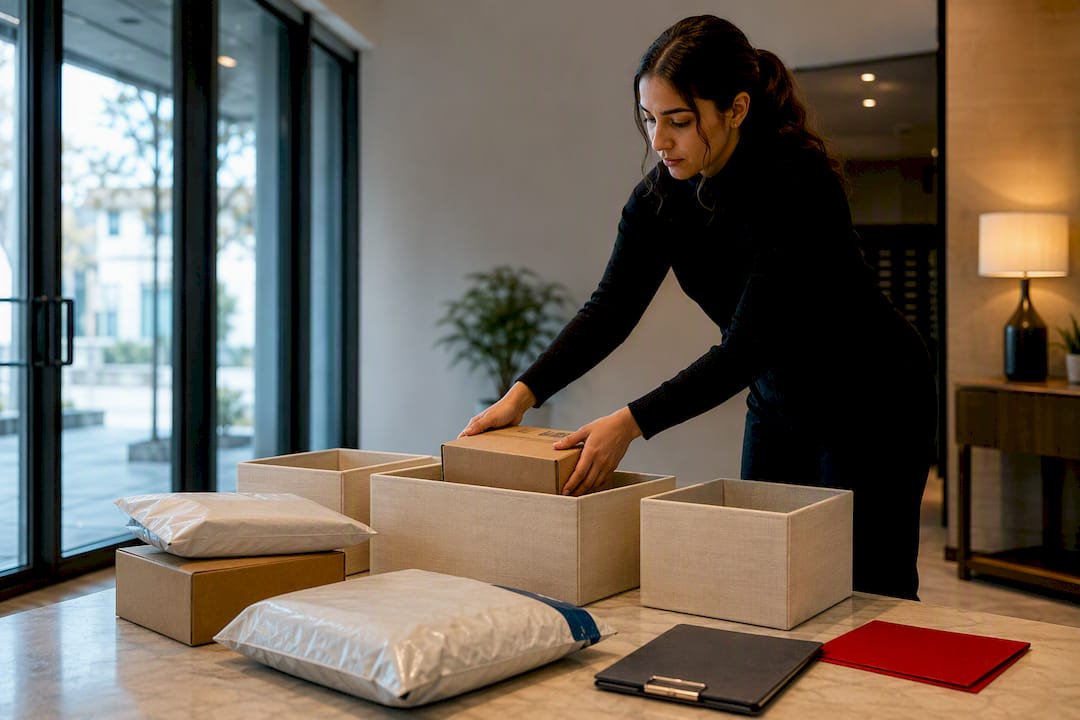
When your locker or package-room system goes down, the on-duty manager or designated package coordinator must immediately switch to manual intake: log every incoming parcel by hand, stage it in a secured, access-controlled area, and notify residents within the hour. That single move keeps deliveries flowing, prevents lost packages, and buys time to bring in temporary capacity or restore the system. Everything else, the staffing, the overflow rules, the vendor calls, builds outward from that first step.
TL;DR:
- Assign a single incident owner on site who is responsible for immediate logging and coordination during the first eight hours of a locker outage.
- Transition to manual parcel intake with detailed logging, secure overflow zones, and resident notifications within 60 minutes to prevent resident complaints.
- Use modular locker options like Flex Locker for outages expected to last more than a week, as they deploy within days and don’t require extensive hardwiring.
- Reinforce carrier compliance with clear pictorial SOPs, QR or PIN systems, and regular spot-checks to reduce future system failures caused by driver bypass.
- Conduct a thorough post-outage review by reconciling packages, analyzing resident complaints, and updating procedures to improve future response and prevent recurrence.
Table of Contents
- Locker Downtime Contingency: What to Do in the First 0 to 8 Hours
- How Do You Manage Manual Intake for 72 Hours?
- What Are the Fastest Temporary Capacity Fixes?
- How Do You Fix Carrier Compliance to Prevent Future Outages?
- What Should Your 72-Hour Post-Outage Audit Cover?
- How Postal Solutions and Luxer One Keep You Covered During Downtime
- Why Process Beats Hardware Alone
- Sources
- FAQ
Locker Downtime Contingency: What to Do in the First 0 to 8 Hours
The first eight hours decide whether an outage stays a minor inconvenience or turns into a resident-relations problem. Move fast, assign ownership, and document everything.
- Name one incident owner. Whoever is on-site (property manager, package coordinator, or a trained lead) becomes the single point of contact for the outage. No committee decisions, no ambiguity about who logs what.
- Switch to manual intake immediately. Every parcel gets hand-logged before it touches a shelf.
- Secure and separate overflow. Perishables, oversize items, and anything requiring signature go into distinct, clearly marked zones, not a general pile.
- Push resident notifications within 60 minutes. Silence breeds complaints faster than the outage itself does.
Your intake log needs to capture, at minimum:
- Carrier name and driver ID if available
- Tracking number (photographed if you can’t scan it)
- Unit number and resident name
- Time of intake
- A photo of the package label and condition
- Notes on any damage, missing labels, or oversize handling
A basic resident message template works for both SMS and lobby postings: “Our package system is temporarily offline. Packages are being hand-logged and held securely at [location]. Please bring photo ID for pickup. We’ll notify you the moment normal service resumes.” Post it at the mail area, email it, and text it if your platform allows batch messaging.
Pro Tip: Keep a laminated copy of the intake log template and outage message in the leasing office at all times. When a system fails at 6 p.m. on a Friday, nobody wants to be drafting a resident email from scratch.
Carrier non-compliance, drivers skipping the proper drop-off process, is one of the most common root causes behind locker system failures, so your first eight hours should also include flagging drivers who try to bypass your temporary intake point.
How Do You Manage Manual Intake for 72 Hours?
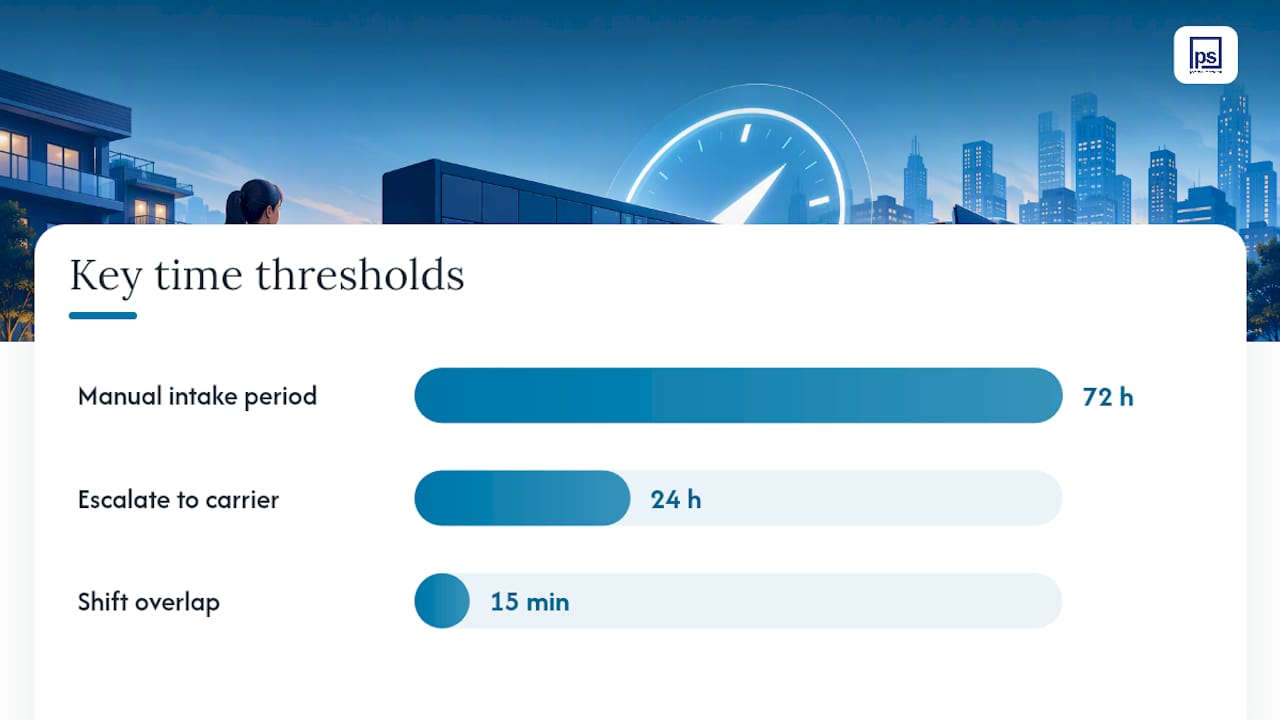
Once the immediate scramble is over, you need a repeatable workflow that doesn’t burn out your staff over a long weekend or a multi-day outage.
Map every incoming package to a unit number the moment it arrives, not at some batch-processing point later in the day. Verify resident identity at pickup with photo ID matched against your log, and have the resident initial or digitally sign confirmation of receipt. Keep the physical or digital log in one consistent location, ideally the same spreadsheet or clipboard system your team already knows, so there’s no confusion about where records live.
- Assign two staggered shifts if the outage runs past a single business day, so no one person carries the load alone.
- Build in a 15-minute overlap between shifts to hand off open issues.
- Flag any package without a clear tracking match as “unverified” rather than guessing.
- Escalate lost or unlogged packages to the carrier’s local dispatch within 24 hours, not at week’s end.
Pro Tip: Assign a backup coordinator on day one. If your primary incident owner gets sick or goes on PTO mid-outage, you don’t want the whole log system to stall out.
What Are the Fastest Temporary Capacity Fixes?
Manual workflows buy time, but they don’t scale past a few days without real hardware backup. This is where modular and rental locker options earn their keep.
Modular locker banks like Flex Locker integrate wirelessly with your existing Luxer One system and can be deployed for roughly 90-day stretches without any hardwired installation. That matters because it means you’re not waiting on an electrician or a permitting delay while packages pile up in a hallway.
For overflow that doesn’t fit lockers, whether that’s oversize furniture boxes or perishable grocery deliveries, a dedicated staging room with climate control and door access logging works better than stacking items in a public lobby. If you’re using outdoor units temporarily, factor in weather exposure and theft risk before committing to that setup.
- Choose temporary hardware when: you expect the outage to run more than a week, or your resident count makes manual logging unsustainable.
- Choose managed room operations when: the outage is short-term and your existing package room has enough floor space to absorb overflow with staffing support.
Turnaround on modular deployments typically runs in days rather than weeks, since no-hardwiring temporary banks skip the permitting and electrical work that slows down permanent installs. Vendor coordination for these deployments usually means a site walkthrough, a delivery date, and a same-day or next-day activation once units arrive on-property. Properties that pair modular expansion with a managed daily support layer recover faster and see fewer resident complaints during the transition.
How Do You Fix Carrier Compliance to Prevent Future Outages?
Most locker outages aren’t hardware failures. They’re carrier drivers finding workarounds, jamming units, propping doors, or dumping packages outside the system entirely because it’s faster for their route.
A one-page pictorial SOP posted at your delivery entrance solves more of this than any software update will. Show, don’t tell: a photo of correct staging, a photo of what not to do, and a clear line for who to call with questions.
- Post a laminated pictorial SOP at every delivery entrance, updated whenever hardware changes.
- Use a simple QR code or PIN system so repeat drivers get recognized and tracked over time.
- Run a monthly spot-check: pull five random deliveries and verify they followed the logged process.
- Watch for early warning signs, packages left outside the locker area, doors propped open, unusual clustering near a single unit, and address them within 48 hours, not at the next scheduled review.
- During any temporary deployment, brief carriers in person or via a posted notice before the new equipment goes live, not after the first missed delivery.
Carrier training paired with a consistent pictorial SOP tends to produce outsized returns during peak delivery periods, and it’s a one-time investment you can reuse across every property in a portfolio. Reinforcing carrier adherence to drop-off workflows is one of the more overlooked levers property teams have for cutting outage frequency long-term.
What Should Your 72-Hour Post-Outage Audit Cover?
Once systems are back online, the outage isn’t over until you’ve reconciled the numbers and closed the loop.
- Count and match. Reconcile every logged package against carrier tracking data and resident pickup confirmations.
- Review resident complaints. Cross-reference any complaint against your manual log to confirm whether it was a logging gap or a genuine miss.
- Update your SOP. Fold whatever went wrong, a bottleneck, a miscommunication, a carrier issue, into your written procedure before you forget the details.
- Escalate to your vendor if needed. If the root cause was a software or hardware failure rather than a process gap, loop in your Luxer One support contact.
| KPI | What it tells you |
|---|---|
| Package acceptance rate | Whether intake kept pace with delivery volume |
| Unlogged deliveries | Gaps in your manual process |
| Pickup lag time | How quickly residents retrieved held items |
| Staff hours logged | True labor cost of the outage |
How Postal Solutions and Luxer One Keep You Covered During Downtime
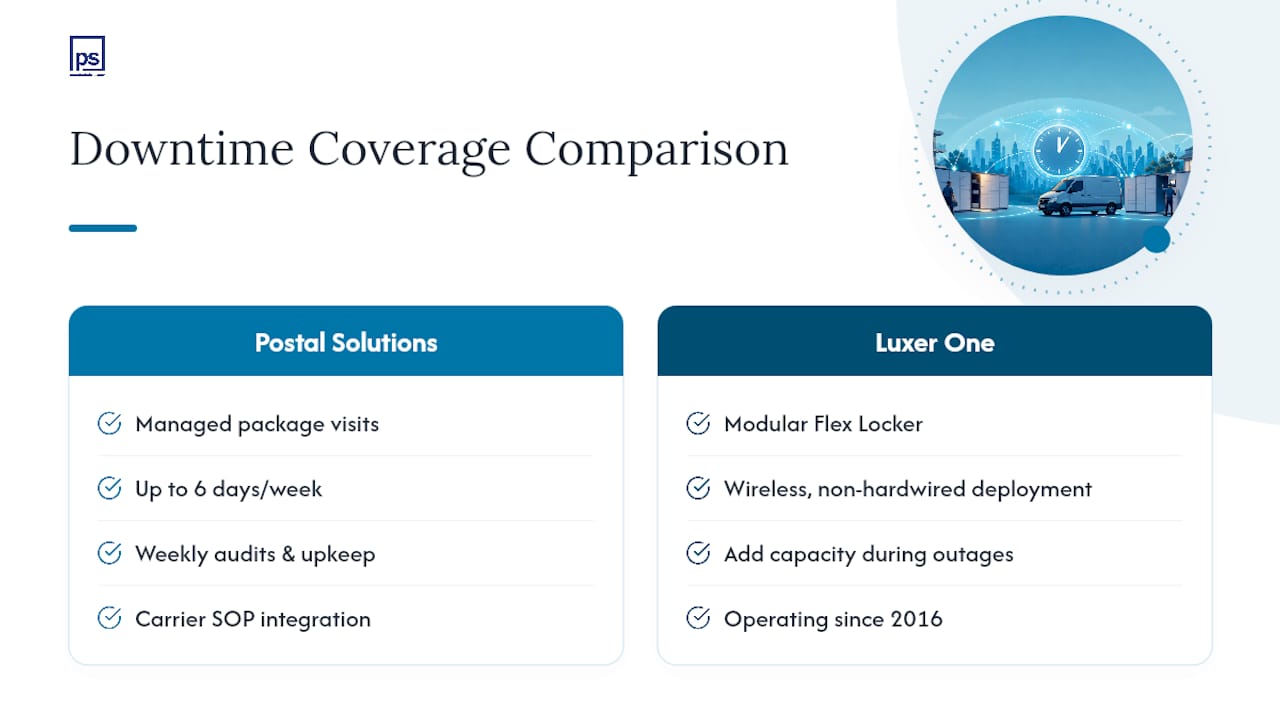
Postal Solutions built its service around the gap that outages expose: hardware can fail, but daily human oversight rarely does. Our package coordinators visit properties up to six days a week to organize package rooms, highlight or handwrite unit numbers on incoming boxes, and run weekly audits using whatever package software your community already owns. That accountability layer is exactly what prevents a short-term outage from turning into a week of lost packages and frustrated residents. Carrier SOP integration comes standard with our managed visits, so drivers already know the correct staging process before anything goes wrong.
Since 2016, Luxer One has served multiple states. If your existing system goes down, Luxer One’s modular Flex Locker option gives you a wireless, non-hardwired path to added capacity without waiting on a full new installation.
If you want a contingency consultation or a temporary deployment quote, visit Postal Solutions to talk through your property’s specific setup. For broader operational benchmarks across the property industry, Prop Report is a useful resource to keep in your back pocket.
Why Process Beats Hardware Alone
Property teams love to blame the box. In our experience managing package operations across hundreds of communities, the box is rarely the actual problem. Daily organizing and weekly audits catch small failures, a mislabeled unit, a driver skipping the scan step, before they compound into a resident-facing outage. One property we’ve worked alongside cut pickup-related complaints by more than half simply by adding a documented daily audit on top of their existing locker system. If you do nothing else this week, write down who owns your outage response and post it where your staff can see it.
— Postal Solutions
Sources
- Smart locker solutions — temporary locker expansions (Flex Locker) | Luxer One
- A framework for solving multifamily’s package management problem | Insights by Blueprint
FAQ
What Is the First Step in a Locker Downtime Contingency Plan?
Assign a single incident owner and switch immediately to manual intake logging, capturing carrier, tracking number, unit, and time for every parcel.
How Long Does a Temporary Locker Deployment Take?
Modular options like Flex Locker typically activate within days since they require no hardwired installation, unlike permanent locker banks that need electrical work and permitting.
What Causes Most Locker System Outages?
Carrier non-compliance, drivers bypassing proper drop-off procedures, is one of the most common root causes of recurring locker failures.
Should We Rely on One Locker Vendor or Multiple Systems?
Many operators run two or three vendors in parallel because single systems face capacity and dimensional limits, but strong process and carrier compliance matter more than vendor count.
Can Postal Solutions Help During an Active Outage?
Yes. Postal Solutions offers managed daily package room organizing, weekly audits, and Luxer One modular locker sales and installation to restore capacity and prevent recurring downtime.